Books check and tie-out
Two pre-review safeguards: an AI books scan before drafting and deterministic tie-out checks on every draft.
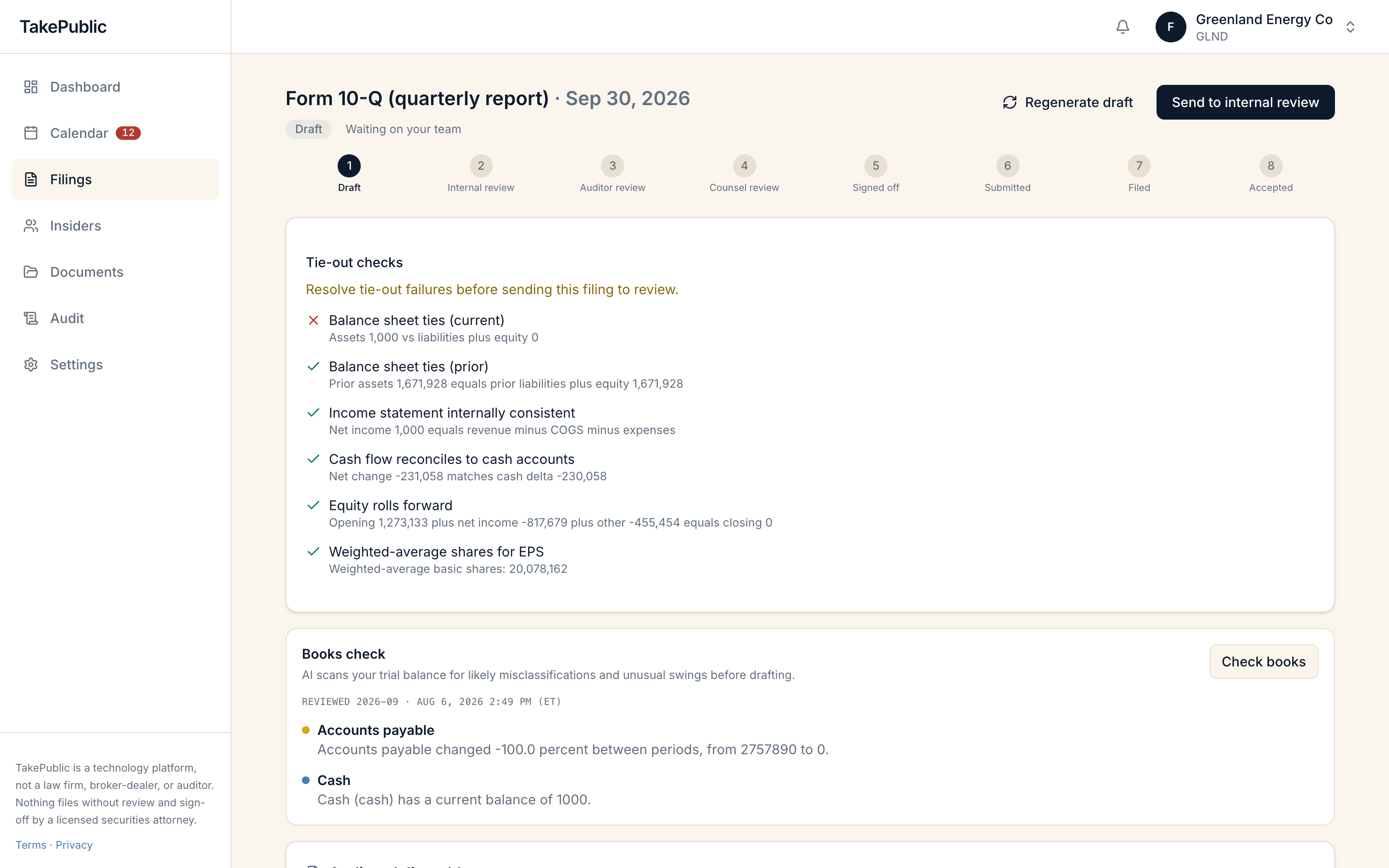
Books check (AI)
Before you generate a draft, the Books check panel scans your trial balance for likely misclassifications and unusual swings. It flags accounts with unusual signs, large period-over-period swings, and balances that look misclassified.
Output is machine-generated and needs human review; a clean result is a screen, not an audit.
When the books check runs
Company admins and users see Books check while a filing is in draft or changes requested. Results show the period reviewed and a timestamp in ET.
- Select Check books to run a fresh scan.
The latest review is stored on the company workspace until you run it again.
Tie-out checks (deterministic)
Every draft generation runs automated tie-out checks against the ledger-backed financial statements. These are deterministic math checks, not AI.
The workspace lists each check with pass or fail and a detail line. Failed checks are flagged with a prompt to resolve them before sending the filing to review.
- Balance sheet ties (current and prior, when comparative periods exist).
- Income statement internally consistent (net income equals revenue minus COGS minus expenses).
- Cash flow reconciles to cash accounts.
- Equity rolls forward.
- Weighted-average shares present for EPS.
How they differ
The books check is an optional AI screen you run before drafting. Tie-out checks run automatically on every draft and verify that rendered statement figures reconcile internally. Statement figures render from your ledger rather than being generated by the model; tie-outs confirm the rendered output is arithmetically consistent with your books.
Was this helpful?
Thanks for the feedback.Create a current report from the Filings page: item selection, event date, summaries, deadline, and review path.
Still need help?
Sign in and open the Help widget from the lower right corner to message the team. Replies land in the app and by email.
TakePublic is a technology platform, not a law firm, broker-dealer, or auditor. Nothing files without review and sign-off by a licensed securities attorney.