Text messages: opt-in and consent
- Effective date
- October 22, 2026
- Applies to
- Text messages from TakePublic
- Contact
- hello@takepublic.com
- Version
- Current
TakePublic Deadline Alerts is an SMS program for TakePublic customers. Company members who opt in receive automated text messages about their own company's SEC filing deadlines and, if they turn them on, service status updates. TakePublic also texts one-time codes and, to a person who opts in on a request's page, a notice when a company emails them a request or changes their mobile number while a request for their signature is open. This page is the public record of how consent is collected and what each message is.
How you opt in
Opt-in to Deadline Alerts happens only inside the signed-in TakePublic application. There is no other enrollment path: no numbers are imported, purchased, or enrolled by default.
- A member signs in and enters their own mobile number under Settings, Notifications.
- They tick a consent checkbox, unchecked until they do, that shows the words quoted below with links to these terms and the Privacy policy. The number cannot be saved for alerts without it.
- Or, on a deadline's Remind me sheet in the calendar, they tick the same consent checkbox, which also turns on a text reminder for that deadline, and save.
- Service status texts start only when the member turns on Text for Service status under Settings, Notifications, after consenting.
- Consent is recorded with a timestamp and the version of the words shown.
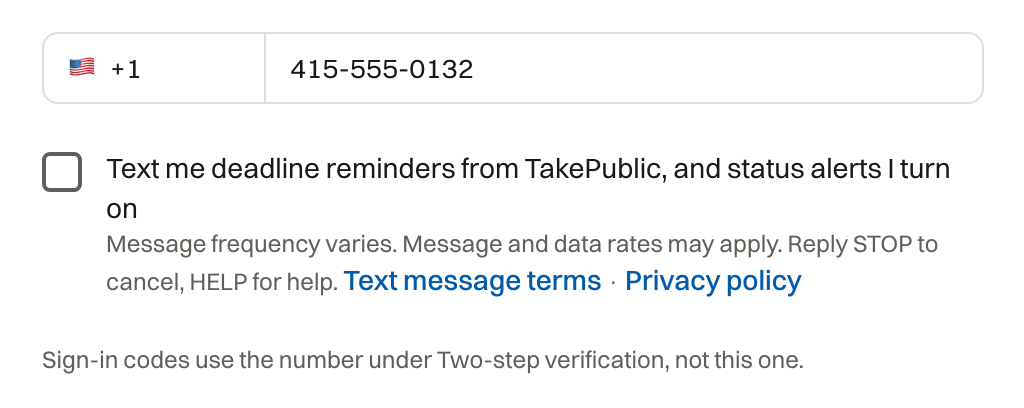
Consent disclosure
The consent checkbox reads, quoted in full:
Text me deadline reminders from TakePublic, and status alerts I turn on. Message frequency varies. Message and data rates may apply. Reply STOP to cancel, HELP for help.
What you receive
Deadline reminders: texts about the member's own company's SEC filing deadlines, 1 day before each deadline, on the due date, and 1 and 7 days past due until resolved, plus any other reminder days the member chooses for a deadline (up to 30 days before). Deadlines are Eastern Time and messages say so (ET).
Service status alerts: only after the member turns on Text for Service status, a text when a TakePublic incident or maintenance notice is posted or updated.
Message frequency varies with the company's deadlines; a company with few filings receives few messages. Sample messages:
- TakePublic: Acme Corp 10-Q due Nov 16, 2026 (ET). Reply STOP to opt out.
- TakePublic: Acme Corp 10-K due today (ET). Reply STOP to opt out.
- TakePublic: Acme Corp NT 10-K was due Mar 31, 2026 (ET) and is past due. Reply STOP to opt out.
- TakePublic: Acme Corp Form 4 due Sep 2, 2026 (ET). Reply STOP to opt out.
- TakePublic status, Investigating: Filing submissions delayed. status.takepublic.com Reply STOP to opt out.
One-time codes
When a person asks for a code on a signing, sign-off or response page, TakePublic texts a one-time security code to the mobile number on file for them: the number the company recorded for them, or the number on the invitation. TakePublic texts US mobile numbers only; a person with no US mobile number gets codes by email. The page says where the code went. One text per code. After a STOP reply, codes are emailed. Message and data rates may apply. Reply HELP for help or STOP to stop these texts, or contact the company that sent the link or hello@takepublic.com. Wireless carriers are not liable for delayed or undelivered messages.
Contact change notices
When a company changes the mobile number it recorded for a person while a request for that person's signature is open (a Form 3, 4 or 5, or a signature page), TakePublic texts the number being replaced, so its owner can tell the company if they did not ask for the change. The text goes only to a number whose owner opted in there to notices about requests (below), and never after a STOP from that number. One text per change. An email goes to the person's address on file as well. Message and data rates may apply. Reply HELP for help or STOP to stop these texts, or contact the company or hello@takepublic.com.
- TakePublic: HLAN changed your mobile while a form awaits your signature. Not you? Tell them. Reply STOP to opt out.
Notices about a request
When a company emails a request through TakePublic to a person whose mobile number it recorded (an attorney asked to sign off on a filing, or an insider asked to enter their own EDGAR codes), TakePublic texts that the request is in their email, and again with each reminder the company sends, only after that person has opted in themselves. Until then the request goes by email only. Each notice ends with Reply STOP to opt out.
The person opts in on a page they open with a one-time code: an attorney's sign-off page, an insider's signing page, or the Form 5 and D&O pages. After the code checks out, an optional checkbox shows the words quoted below, with the number masked as the page shows it, and links to these terms and the Privacy policy. It is unchecked by default and never needed to sign or respond, and clearing it withdraws consent. The opt-in is recorded for that mobile number with the time, the page, the request and the person it named, the words shown and their version, and TakePublic texts one confirmation.
The checkbox reads, quoted in full for a number ending 0111:
Also text me at ***-***-0111 from TakePublic when a company sends me a request. Message frequency varies. Message and data rates may apply. Reply STOP to cancel, HELP for help.
Opting out and getting help
Reply STOP (or CANCEL, QUIT, OPTOUT, UNSUBSCRIBE, STOPALL, REVOKE, END) to any message to stop receiving texts immediately. Reply START to resume. Reply HELP or INFO for help, or contact hello@takepublic.com. A number can also be removed at any time in account settings, a request notice opt-in can be cleared on the page where it was given, and opt-out status is re-checked before every send.
Rates, carriers, and privacy
Message and data rates may apply. Consent is not a condition of purchase. Wireless carriers are not liable for delayed or undelivered messages. No mobile information will be shared with third parties or affiliates for marketing or promotional purposes.
The full program terms are in the Terms of service (section 5, Deadlines, the compliance calendar, and text messages) and the Privacy policy.
Questions? Contact hello@takepublic.com.