Insiders and Forms 3, 4, and 5
Track reporting persons, record transactions, and draft Section 16 forms filed under each insider's own CIK.
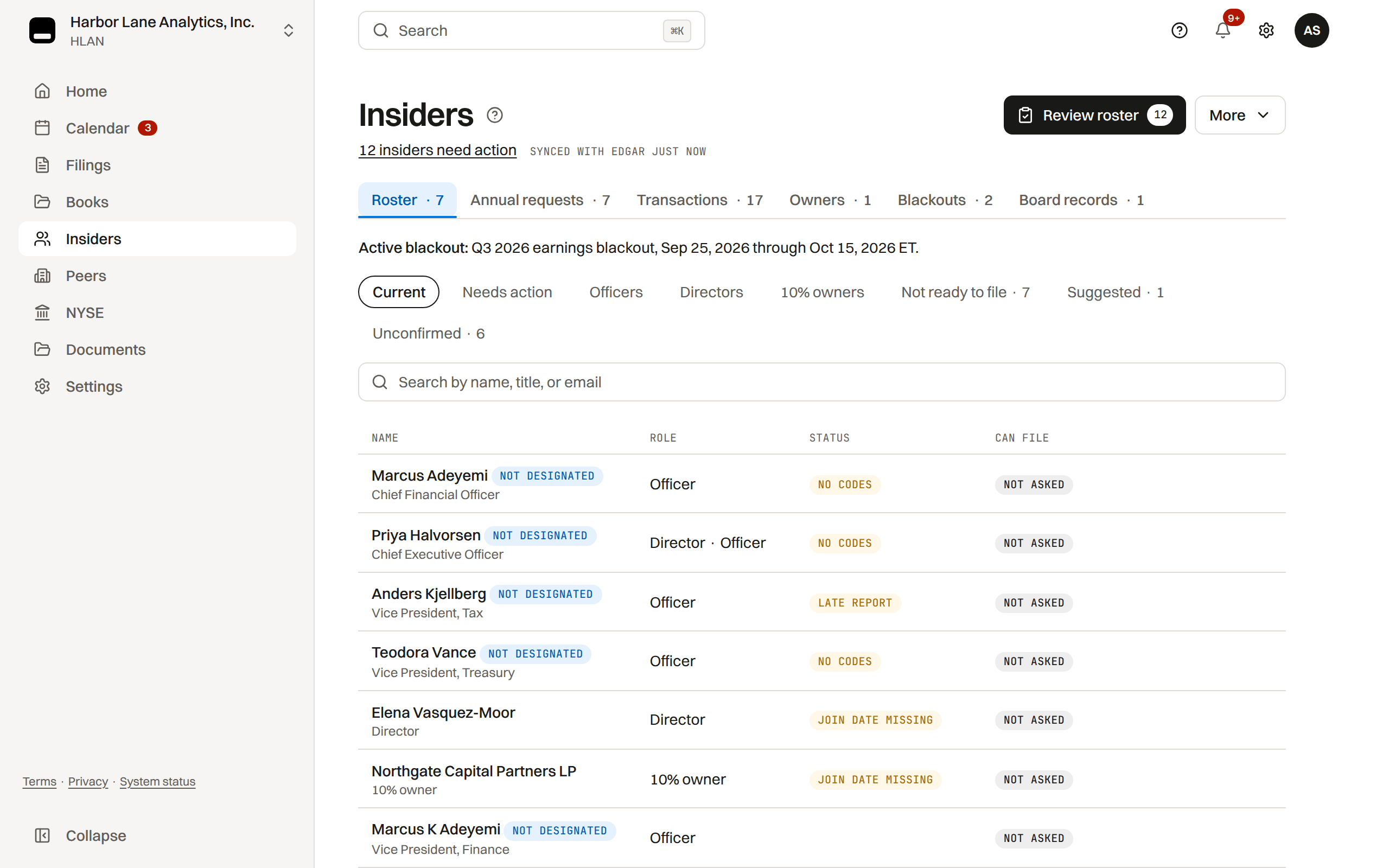
The insider roster
Add directors, officers and 10% owners on the Insiders page, or pull them from recent Section 16 filings with Sync EDGAR.
Each insider carries roles, an officer title, share holdings, the date they became an insider and their own EDGAR CIK; a person imported from EDGAR is named in title case ("Robert Brooks Price"), with the filed name kept as the EDGAR identity.
Add insider asks for the date the person became an insider and starts their Form 3 clock from it (due 10 calendar days later). Add with details missing saves the person without it: they count as a current insider and read No Form 3 date, and no Form 3 clock runs until the date is recorded; Finish adding reopens Add insider where they were saved.
The Form 3 column reads On file with the filing linked, the due date while the ten days run, or "Form 3 not found on EDGAR (checked Sep 14, 2026)"; it reads "Not checked" until the filed history has been imported.
A row that needs something carries one Needs action chip with the reason (Late report, Confirm CIK, No Form 3 date, No CIK, No Form 3, Join date missing, No codes) and sorts to the top; the person's record opens on the same reason and the one action that settles it.
Can file, on the plans that file Forms 3, 4 and 5, says whether TakePublic can file a Section 16 form for the person: Ready once their codes are on file and EDGAR confirms the delegation, else what is missing.
A person filing through their own agent reads Files elsewhere, and a former insider Nothing due; a Form 4 can still be owed after leaving, for a trade made in office and not yet reported or a trade within six months of an opposite trade in office (Rule 16a-2(b)).
The action lives on the insider's record, as one button on the row of the tab that settles it, and the tab carries an amber dot while it is open: the Forms tab's Form 3 row (Record when Maren joined, Open Form 3, Draft Form 3 or Record Form 3 as filed) or the EDGAR filing tab (Confirm CIK, Enter CIK, Set up delegation, Enter codes, or Add email only while a form in progress waits on the person).
Review roster, in the page header while anyone needs it, opens one queue of every person the roster cannot yet act for, each row naming its gaps: Unconfirmed (not named in the newest proxy or 10-K and no recent role-marking form), No join date, No email (on plans that send Form 5 requests and signing links) and No CIK (or a CIK matched by name that waits for Confirm).
A person's gaps are fixed in the queue's side panel, and the bulk records for a large roster sit in its toolbar.
An insider's email is needed only when that person must act inside TakePublic: to sign a form we prepared, to enter their own EDGAR codes or delegate their EDGAR account to us, or to answer a link we host. Everything else is a fact the company records directly. On Monitor nobody files through us, so an email is never required.
- More › Add from a spreadsheet adds many people at once from pasted rows or a CSV or Excel file with a header row (Name, Title or Role, Became insider; Email, Mobile and CIK are read too). You review every row first: people already on the roster are skipped, and a row with no role cannot be added. A person whose Form 3 is not yet past due gets the Form 3 clock, as Add insider starts it; an older start date is recorded with no clock.
- On Section 16 and Core, Add contact details (in the Needs action view while someone has no email) fills emails and mobiles for people already listed, the same way.
- When an insider files a Form 3, 4 or 5 through their own agent, TakePublic's daily EDGAR check adds the form to their record, closes the deadline it answers and tells the company's admins and roster managers, on every plan (the Filings row on Settings › Notifications). Sync EDGAR picks it up at once.
- An insider you added by hand with no CIK is matched to a filed Form 3 by name on the next Sync EDGAR: the filed CIK attaches with an amber chip under the name ("Matched by name from Form 3 filed Apr 17, 2026, confirm"), the row's Can file badge reads CIK, and Confirm CIK sits on the person's record; the person's Form 3 row on the calendar closes on that filing. Case, punctuation, and a missing middle initial or suffix never count against a match; a different one does.
- When two filed owners could be the person, the row reads "Two possible matches on EDGAR by name, add the CIK" and nothing attaches. A CIK you type yourself always wins.
- A Form 3 that was due more than a year before the history check, for a person whose later Forms 4 and 5 the history holds, reads On file, confirm on the earliest filing that names them: it was filed before the history TakePublic read, under an earlier CIK or on paper. Confirm records it as on file, or record its accession; the row never shows a years-old overdue clock.
Insiders with recorded transactions cannot be deleted; their filing history must be preserved.
When someone leaves
Record the day a person stopped being a director, officer or 10% owner with Record departure in the record's "..." menu (the date is prefilled with today), or in Left the company on under Edit details. They become a former insider: their filed forms and late reports stay on record and the Item 405 sentence names them as "a former director", while the forward-looking work ends.
- Their Form 3 clock ends and their open Section 16 deadline rows are waived; the audit trail lists the rows and the status each had.
- Form 5 confirmation and D&O questionnaire requests refuse them by name ("Pat Lee is a former insider and is no longer sent requests"); clear the end date to include them again.
- The roster lists former insiders behind one Former pill, each marked Former insider; their record keeps every filing and audit row.
- Nobody is deleted. Added by mistake appears in the record's menu only when nothing on record points at the row (no filing, transaction, Form 5 or D&O row, ownership attribution or Form 3 on file); a duplicate or wrong-person row goes that way, and the audit trail keeps the removal.
- Clearing the date brings back exactly the rows it waived, each to the status it had. A row already waived before that day, or one satisfied since, is never touched.
The end date cannot be before the date they became an insider.
Bringing in your existing paperwork
Moving from another tool or from spreadsheets, choose Bring in your paperwork in the Insiders page's More menu and drop the files you already have, many at once: PDF with a text layer, Word, text, HTML, XML, CSV or Excel, up to 10 MB each.
TakePublic reads each file, matches it to a person on the roster (by CIK where the document states one, otherwise by name) and lists it as a suggestion: what it thinks the file is, the person, and what confirming does. Nothing is recorded until you confirm it.
- Signed powers of attorney and Exhibit 24s become a power of attorney to record, with the file as its document. An Exhibit 24 from an EDGAR submission keeps its accession, so it is recorded as on file with the SEC. The same suggestion shows on the person's record.
- Rule 10b5-1 plan documents become a plan with its adoption date, the file kept with it; the cooling-off period shown is the rule's.
- Holdings reports and old vendor workbooks list, for each person, our ledger against the report on the report's date. Differences are listed; record any correction from the person's Transactions, then Mark reviewed.
- Signed Form 5 representation letters record the year's Form 5 answer, with the letter kept as its evidence.
- An insider trading policy is read into the policy card on Blackouts for a company admin to confirm. A filed Form 3, 4 or 5 is brought in with Upload a Form 3, 4 or 5 instead.
- Anything else reads "Couldn't tell what this is": attach it to a person's documents or discard it.
The company's own team confirms; a preparer can drop files and read the list. Social Security numbers, dates of birth and account numbers are never kept from what is read; the original file is kept only where its record keeps a document.
Plans and holdings an insider tells you about
An insider with a TakePublic account can tell you about a Rule 10b5-1 plan they adopted, a modification or early end of a plan you recorded, or shares they hold through a trust, spouse, family member or entity. Each lands on their record's Form details as a suggestion in Rule 10b5-1 plans or How shares are held, with an Insider pill naming who sent it and when, and on Home under Needs you.
The pill says Verified with EDGAR only when the person's own CCC tested OK with EDGAR from the login that sent it; otherwise it reads Not verified. A company's link, a name or an email address never verifies who sent it.
Record from insider opens the section's record sheet prefilled for you to check and save; from then on the plan or holding is the company's record, with who told it kept in its history. Record change records a modification or early end on the plan it names; a plan read from filed forms keeps its filed values.
Dismiss asks for one reason (Already recorded, Not a Rule 10b5-1 plan, Not the company's securities, or Other reason); the person sees that reason and nothing more.
- Plans carry the Aggregate shares and Plan ends that Item 408(a) discloses. A plan's scheduled end is an expiry, never a termination.
- Each suggestion lists what is worth a look: when the cooling-off period ends (Rule 10b5-1(c)(1)(ii)(B)), another recorded plan in force on the adoption date (Rule 10b5-1(c)(1)(ii)(D)), and an adoption inside a blackout window on your calendar. These are arithmetic, not a judgment of the plan; your counsel decides.
- Once recorded, the plan is the one pre-clearance offers the insider under Under a Rule 10b5-1 plan, and the one a Form 144 cooling-off flag and the Form 4 checklist count from.
- Company admins and company users on Section 16 record or dismiss. Available on every plan, Monitor included.
Shares beneficially owned
The balance on the roster is what Forms 3 and 4 report, so it is recorded once and then moved only by the record.
While no filed Form 3 or 4 is on record for a person, you may enter their opening balance one time; the roster shows it as entered by you, with the date. After that, and for anyone with a filed form on record, the balance moves only when you record a transaction (shown as recorded by you) or when the EDGAR sync reads a filed Form 3 or 4 (shown with that filing's accession).
- To correct a balance that is already on record, record the transaction that explains the change; a typed number is refused with the reason.
- Each balance shows its source. A balance recorded before sources were kept reads "Source not recorded".
- On a Form 4 filed jointly by several reporting persons, the direct Table I rows set the first-named owner's balance, and an indirect row sets the balance of the owner its nature of ownership or footnote names ("By Sampson Family LLC"). The source pill stays on the accession that set the number, so a CEO filing with a family entity keeps a current holding and the entity reads its own.
Shares in an IRA, a spouse's name or a trust
Forms 3, 4 and 5 report the shares a person has a pecuniary interest in, the chance to profit from them, whoever holds them (Form 4 General Instruction 4(b), Rule 16a-1(a)(2)). Shares in the person's own name or held by their broker for their account are reported as direct; shares they profit from that are held in another name are indirect, each on its own line with its nature stated ("By Spouse", "By X Trust").
Filers commonly report shares in an IRA as an indirect holding on its own line ("By IRA"), and a trade there reaches the Form 4 like any other trade. Whether a particular account is reported as direct or indirect, and whether a spouse's or relative's shares count as the insider's, is counsel's call.
Record each way the person holds shares under How shares are held on their record's Form details, with its nature; the Form 4 then files that line's trades and balance separately from the direct ones.
One person, two CIKs
EDGAR sometimes holds two CIKs for one person, usually because a second Form ID was granted. EDGAR keeps both, since a CIK is permanent and never changes; the person keeps filing under one, normally the CIK their recent forms use, and EDGAR Filer Support at the SEC answers questions about the other.
When the history import finds forms under another CIK that could be the same person, their record asks: "Possibly the same person as CIK …". Same person reads that CIK's filings as this person's, at your company only; Not the same keeps them apart.
The person can answer the same question on their own home ("Is CIK … also you?"); once their EDGAR codes are verified, their answer joins the two CIKs at every company. When each CIK has its own login or EDGAR codes on TakePublic, write to the team in Help to join them.
Stock splits and stock dividends
A split or stock dividend is reported on no Form 4 line (Rule 16a-9(a)); what changes is every position after it, so it is recorded once and each insider's holdings follow.
- On the Insiders page, open More, then Record a stock split (company admins and company users).
- Choose the kind (forward split, reverse split or stock dividend) and enter the ratio of new shares for old, as the board stated it.
- Enter the effective date: trades on that day and after count as post-split.
- Choose how the plan treats fractions: cash in lieu and rounded down (the default), rounded up, or fractional shares issued.
- On Section 16, TakePublic restates each insider's positions, options included with their exercise prices, and the Insiders page asks you to confirm them ("Confirm the 1-for-4 reverse stock split for 12 insiders"): each person, or Confirm all as proposed.
- Change a figure with a note saying why it differs, or mark a position Not adjusted by the plan to keep it as it was.
- The next Form 4 carries a footnote on its first post-split row explaining the restated balance; you can remove it.
- On Monitor, each insider's forms filed after the split carry the restated positions.
Filed by the insider, not the company
EDGAR requires Forms 3, 4, and 5 to be submitted under the reporting person's own CIK and CCC.
- The EDGAR filing tab on the person's record holds the CIK, codes and delegation behind Can file. The CCC is stored encrypted and used only for that person's Section 16 submissions.
- The mailing address fills the form's Name and Address of Reporting Person box. A blank address is filled from the person's filed Form 3, 4 or 5 at the company or, failing that, from their own EDGAR filer record, and shows that EDGAR source. An address you type is never replaced.
A form missing the person's codes is held with a message saying so, never sent as an invalid filing.
Posting filed forms on your website
Rule: once a Form 3, 4 or 5 is filed, a company with a website must post it there by the end of the next business day and keep it there for at least 12 months (Rule 16a-3(k), 17 CFR 240.16a-3(k)). TakePublic does not post it to your website.
- When EDGAR accepts a Form 3, 4 or 5, or an amendment, that TakePublic sent, company admins get the acceptance email and notification with the posting date and a link to the filed copy on EDGAR.
- The date counts from EDGAR's filing date, not the time of acceptance: a Form 3, 4 or 5 accepted by 10:00 PM ET on a business day keeps that day's filing date (Regulation S-T Rule 13(a)(4)).
Recording a transaction
Record the purchase, sale, grant, exercise, gift, or other coded transaction on Insiders.
- Record transaction starts from the document. The first line on the first step reads Start from the broker confirm: drop the PDF or email here, or paste its text. Drop it there or use Choose file: a PDF, a saved email (.eml), an HTML page or a text file, up to 10 MB. TakePublic reads it the way it reads a forwarded confirm, or as a pasted description when it is another kind of document, and fills the insider, date, code, shares and price for you to check; Paste text takes the confirmation's text or a sentence instead. No file? Type in the fields below it.
- The insider is picked from the account holder the document names, matched to your roster the way a forwarded confirm is, when no insider is chosen yet. When the name fits no one, or more than one person, Insider stays empty with one line saying so; when a different insider is already chosen, it stays and one line asks you to check it.
- Options, RSUs and warrants start the same way: Start from the grant notice or the vesting or exercise confirmation fills the security, what happened, the dates, the amounts and the exercise price, and the file is kept on the row as its plan statement.
- A scanned PDF has no text to read: the step says so and you enter the values. Nothing is recorded until you press Record transaction, and then the file is kept on the row as its broker confirmation (an email or HTML page as its text).
- The acquired or disposed indicator defaults from the transaction code; flip it when wrong (a gift received rather than given). Ambiguous codes require an explicit choice.
- TakePublic updates the running share balance, creates the Form 4 draft, and puts the two-business-day deadline on the calendar.
- One insider's transactions of the same day go on one Form 4, one line each (an option exercise with tax withholding is one form with three rows), with one deadline, one review and one signature. A later day's trade joins that Form 4 while every trade on it is still within its two business days: each trade keeps its own deadline on the calendar, and the form is due on the earliest. A transaction recorded after the Form 4 has gone to review or been signed, or once one of its trades is past due, starts its own form, so a document never changes under its reviewers.
- Correcting a transaction's date keeps that rule: the row joins the open Form 4 for its new day and takes that form's deadline, and a form left with no row leaves the calendar with its clock. Once either form has been signed against or is frozen for signing (counsel's sign-off, the reporting person's signature or an outstanding signing link, a signed package), the correction is refused with the reason and nothing moves: send the signed form back to draft first, or remove the row and record it again once the day's form is open.
- A transaction made under a Rule 10b5-1 trading plan checks the form's box and files the plan's adoption date in a footnote (Form 4 Instruction 10). The ledger reads "10b5-1 plan · adopted May 5, 2026" under the code, for rows you record here and for filed Forms 4 the sync reads (the filed checkbox and its footnote); a filed form that checked the box without dating the plan reads "adoption date not stated".
- Form 3 drafts come from the became-insider date and holdings. An insider on board when the company first registered under Section 12 owes Form 3 by the registration's effective date; set that date in Settings.
- A Form 3 draft's holdings can start from a brokerage statement or cap table excerpt dropped over its tables; each holding it lists is offered as a line to add or dismiss. Direct common stock is the insider record's position, changed on the record, never added as a line.
- Form 5 covers year-end reporting; a Form 5 check lands on the calendar 45 days after fiscal year end.
On Monitor, Record transaction records the trade and puts its Form 4 deadline on the calendar; the insider files through their own agent, and Sync EDGAR links the filed form to the recorded row. Drafting Forms 3, 4 and 5 is part of Section 16 and Core.
Holdings beside a Form 4's trades
A Form 4 lists the positions the person holds that no trade on it reports, such as shares a spouse or a trust holds or options already granted. TakePublic carries them from the last filed form, so a typical one-trade Form 4 needs nothing here, and the draft shows only + Add a holding beside joint filers and remarks.
A line added here files as a holding row in place of the position carried from the last filed form with the same class and holder.
- The section opens by itself when there is a reason, named in one line: the draft already lists holdings; the insider record shows a holding the last filed form did not list; a carried position's figure is not the record's latest balance for that holding; a holding the last form listed has ended on the record, so the form no longer lists it; or an option, unit or warrant grant the person still holds is missing from the last filed form or listed there at another amount.
- A suggested row files only once you press Add this row; Dismiss hides the suggestion for this draft.
- A Form 5's holdings the Form 3 left out follow the same rule; a Form 3's holdings are the form itself and always show.
Form 144 sale notices: tracked, not drafted here
TakePublic tracks each Form 144 sale notice EDGAR lists against your company; it does not draft them.
The roster row and the insider's record read "Form 144 filed Sep 1, 2026 by Harbor Street Securities LLC, proposed sale of 8,632 shares", linked to the filed notice. Once the Form 4 clock for the notice's approximate sale date has run with no Form 4 sale on the ledger, Home's Deadlines card carries a Sale notice row for the person.
Rule: a sale is reported on Form 4 before the end of the second business day after it (Exchange Act Section 16(a)(2)(C), Rule 16a-3(g)). Recording the sale, or the sync reading the filed Form 4, clears the advisory; a notice that runs out its three months is let go.
- Rule 10b5-1 plan adoption dates the notice states ride with it; the Form 4 that reports the sale checks the plan box and gives the adoption date in a footnote (Form 4 Instruction 10).
Whether a sale needs a Form 144 (Rule 144(h): more than 5,000 shares or $50,000 in any three months) is a question for the insider's broker or counsel; TakePublic reads the notices EDGAR lists.
More detail
Since April 2023 a Form 144, the Rule 144 notice of a proposed sale of restricted or control securities, is filed electronically on EDGAR, usually by the insider's broker when the sale order is placed. EDGAR lists it under the company's CIK with the insider as filer. The EDGAR sync attaches each notice to the roster row whose CIK (or, for a row with no CIK, whose name) the notice's filer is.
A notice does not itself require a sale, and the broker may sell any time in the notice's three months.
How insider activity appears on the calendar
The transaction date appears in the Public record layer after the transaction is filed, or in the Workflow layer while action is still underway. Its two-business-day Form 4 deadline appears separately in the Regulatory layer. A trade on the calendar opens on Insiders.
Review, filing, and D&O questionnaires
Section 16 drafts pass internal review and counsel sign-off like every filing; they skip auditor review because they carry no audited financials.
- The generated ownership XML includes the reporting person's CIK, relationship flags, transaction coding, footnotes where needed, and the signature block. The reporting-owner block keeps the name as filed on EDGAR; the conformed signature reads /s/ with the roster name.
- The reporting person signs from an accountless signing link. The page names them by their roster name, lists what the Form 4 reports, including the Rule 10b5-1 checkbox and its footnote when the transaction was made under a trading plan, and accepts the typed name in the roster's order or as filed on EDGAR.
- The reporting person signs after counsel signs off, so the signature covers the version counsel approved and a change counsel asks for never means signing twice. Send signing link waits until then, and a link opened before counsel signs off says it is not ready to sign yet.
- Signing links go out once your company is Verified on TakePublic: by an Active EDGAR Next delegation to TakePublic, or by any of the Ways to verify in Settings › Company, where Request verification is the last resort.
- A late or unfiled report is listed in the person's record under Late reports, with its evidence and one remedy (see Late insider reports).
- On Core, send annual D&O questionnaires from Insiders; a recipient with an email on file receives a single-use link. A questionnaire that came back on paper is recorded with Record received and the day it arrived; the row reads Received. Responses store with the insider and can inform proxy and Part III drafting.
- On Monitor and Section 16, TakePublic does not send the D&O questionnaire. Put Annual D&O questionnaire on the Company calendar from Add to calendar to schedule it as your own step with reminders, and send your counsel's questionnaire outside TakePublic. A questionnaire link sent earlier keeps working until it expires.
- A director's submitted answers are read by company admins, counsel and the auditor: their rows offer View answers. Every other seat (a company user, the preparer, another director) sees the row's status and dates only, and TakePublic sends them no answers.
TakePublic checks
Forms 3, 4 and 5 carry TakePublic checks: suggestions counsel reads beside the frozen form before signing off, and the company sees the same list while drafting. What each check compares, and the rule behind it, is explained check by check in one article (see What a Form 3, 4 or 5 is checked against).
Board records: Section 16 officers and Rule 16b-3 approvals
Insiders, Board records keeps two acts of the board that Section 16 reads. A company admin records each once; a record is never edited, a newer one takes over.
- Section 16 officers: the board decides which officers are Section 16 officers (Rule 16a-1(f)): the president, the principal financial and accounting officers, a vice president in charge of a principal unit or function, and anyone else with a policy-making function. Record the resolution, or the 10-K or proxy that names the executive officers under Item 401(b), which the rule presumes is the board's judgment. The newest one is in force.
- When your newest 10-K names its executive officers under Item 401(b), or its Part III incorporates the proxy that does, the list is proposed as a row of Section 16 officers, marked Proposed, with the filing on EDGAR as its source and each name matched to the roster. Nothing is recorded until you record it, as shown or after changes; a name the filing prints that is not on the roster is listed so you can add the person.
- A current officer on the roster whom the designation in force leaves out, or every current officer while none is recorded, carries Not designated on the roster: a prompt to review, never a change to what is filed.
- Rule 16b-3 approvals: a grant from the company (code A) is exempt from short-swing matching when the board, a committee of two or more Non-Employee Directors, or the shareholders approve it (Rule 16b-3(d)); a disposition to the company (code D) or tax withholding (code F) when its terms are approved in advance (Rule 16b-3(e)). Approving a plan covers its transactions only when their terms are fixed in advance; terms an approved grant provides for, such as withholding, need no further approval (Note (3)).
- Record what was approved, by whom, the date and what it covers: listed transactions, or the codes for the people named (everyone when none is named) from the approval date. On the Form 4 review checklist a covered row reads exempt with the approval as its source; a row whose only approval is dated after the trade reads Review.
If the code does not arrive
Look in Spam, Trash and the Promotions or Updates tabs first, and search all mail for the sender: every code comes from noreply@mail.takepublic.com with a subject that names the form and the word "code". Mail servers sometimes accept a message and then file or delete it by a rule you never see; TakePublic keeps the mail provider's delivery record for every code, so the company can confirm that your mail server accepted it.
- Search all mail (including Trash) for noreply@mail.takepublic.com. If the code is there, enter it; a code you already received still works until it expires.
- Add noreply@mail.takepublic.com to your contacts or safe senders, then request a new code: Gmail and Outlook stop filtering a sender you have saved.
- If nothing arrives, ask your IT team to allowlist the domain mail.takepublic.com (Google Workspace: Apps › Gmail › Spam, phishing and malware › Email allowlist, or a Content compliance rule that bypasses the spam folder; Microsoft 365: the allowed senders list in Defender, or a mail flow rule) and to check for a rule that deletes or quarantines mail from it.
- If the invitation carried your mobile number, press Text me the code on the page and the code arrives by text instead. If it did not, ask the company to send a new invitation with your mobile, or to a different email address; the link is bound to the address it was sent to, so the company must send it, not you.
TakePublic never calls, texts or emails to ask for a code; the code is entered only on the page you opened from the link.
Was this helpful?
Thanks for the feedback.Why a Form 3, 4 or 5 shows as late, the evidence behind the verdict, and the one remedy each row offers.
Still need help?
Sign in and open the Help widget in the lower right corner to message the team. Replies land in the app and by email.
TakePublic is a technology platform, not a law firm, broker-dealer, or auditor. Forms 3, 4 and 5 prepared in TakePublic file only after the reviewer the company designates, such as its securities counsel, signs off; any other filing prepared in TakePublic files only after a licensed securities attorney signs off.