Blackout windows
Trading windows are enforced: transactions inside a blackout require an audited admin override.
Setting windows
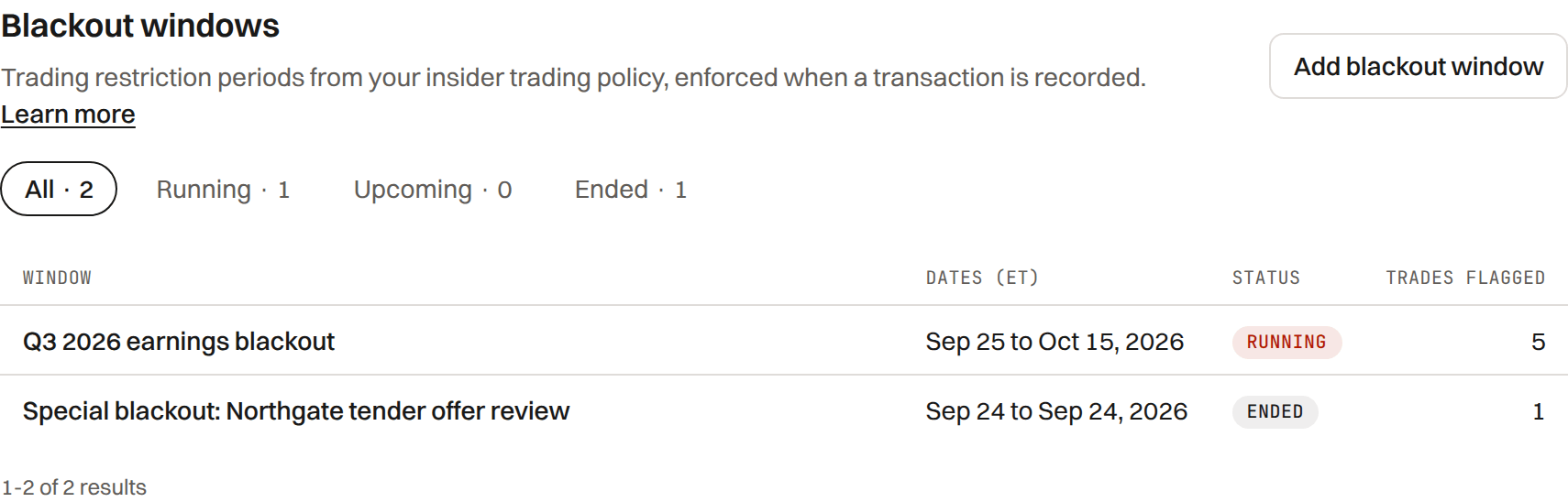
A blackout window is a period when insiders may not trade; it shows on the Company calendar and flags any trade recorded inside it.
A running window shows a banner on Insiders, and every window is a period on the Company calendar with its own sheet.
A company admin adds a window with Add blackout window on the Insiders Blackouts tab, or on the calendar through Add to calendar, A company event, Blackout window: a name and a start and end date in Eastern Time, or a suggested window adjusted.
A running window can be ended early. One that has not started can be removed as added by mistake, and a started window only while no trade was logged inside it.
Suggested windows
The wizard suggests a window for each of the next three quarter ends and the fiscal year end, from the fiscal year end and filer status in Settings.
- Each suggestion starts 15 calendar days before the period end.
- Its end follows the rule in Settings › Insider program: by default the window stays closed through the first full trading day after the quarter's earnings release reaches EDGAR (an Item 2.02 8-K, or the 10-Q or 10-K when it comes first), or it can count from the 10-Q or 10-K filing instead. Until the release is on EDGAR the end shown is expected, not final.
- A window whose end you set by hand is never moved; the earnings end is offered beside it.
- A period already covered by an existing window is shown as covered, and each window notes the federal holidays inside it.
Suggestions are a starting point drawn from your fiscal calendar. Set the dates your insider trading policy calls for.
Enforcement
Recording a trade the insider chose to make, dated inside a blackout window, is blocked, not just flagged. A company admin can record it with a written override reason, for example a sale executed under a pre-existing Rule 10b5-1 plan.
A window restricts the insider's own trades, not the company's acts on dates the award or the board sets. These record inside a window without an override (Form 4 General Instruction 8; Rule 16b-3):
- A grant or award from the company (code A).
- The shares the company withholds for tax (code F).
- An RSU or PSU vesting (code M with no exercise price). An option exercise is the insider's choice of day and keeps the override.
- The row and the Form 4 draft carry a Blackout note naming the window, and the checklist's trading window row reads it as a company act.
The override and its reason, and each company act recorded inside a window, are written to the audit trail.
Special blackouts
A special blackout covers only the people you name, for example the insiders working on a deal. A company admin adds one from the Blackouts tab with Add special blackout: a name only company admins see, the first and last day, and the people from the roster it covers.
It restricts only its people: a trade recorded for anyone else is not blocked, and pre-clearance and the Form 4 checklist read it for its people alone. Only company admins see it on the Blackouts tab and the calendar; a covered person reads it as a trading restriction, never by its name.
Who it covers can be changed from the window's menu, and it ends like any other window.
Notices to insiders
A company admin tells the Section 16 roster when a window closes and when it reopens: on the Blackouts tab, a window's menu, Send a notice. The sheet shows the words the person reads, who receives it (the current roster; a person with no email is listed as skipped) and what was already sent. Each person gets an email with a link; the page records when they mark it read. Nothing they reply comes back to TakePublic.
A notice leads with its days, each with its weekday: the closed notice gives the day the window closed and the day it reopens, or, while the reopening waits on the earnings release reaching EDGAR, that it reopens after the release and the company will say when. One sentence then states the rule, naming the securities by your ticker.
A special blackout's notices go only to its people, in fixed words with no reason: they may not trade until told the restriction has ended, and they should not tell others about it. The email itself names only the company.
In Settings › Insider program, Insider notices, a company admin chooses whether a person sends each quarterly notice (the default) or they go automatically: the closed notice on the business day before a blackout starts, so insiders hear before the trading window closes, and the open notice on the day it reopens once its last day is known. Special blackouts are always sent by hand.
The same section offers the December gift reminder, off until turned on, which tells the roster on the first business day of December that gifts of stock are Form 4 items.
- The same notice for the same window is not sent twice in a day, and a closed notice is not sent for a window that has ended.
- Under the confirmed insider trading policy, Ask insiders to acknowledge asks each current insider who has not acknowledged it to read the policy and confirm they will comply. That page asks for a one-time code first; the person types their name, and the acknowledgment is kept with the policy's version.
- The acknowledgment the person signs is TakePublic's wording, so no request goes out until a company admin records, in Settings › Forms, which of your securities counsel approved it. If the wording changes, it is approved again; links already sent keep working.
- A company with its own acknowledgment wording can use it instead: Add form on the policy acknowledgment's row in Settings › Forms, then enter the words and name the counsel who approved them, which counts as counsel's approval. Each person types their name to sign those words and agrees to sign electronically; the company keeps the words they signed.
Every notice, read and acknowledgment is written to the audit trail.
What blackouts are not
TakePublic records and enforces your policy inside the product, and records pre-clearance requests where the company turns them on; it does not replace your insider trading policy.
Confirm your policy with counsel.
Was this helpful?
Thanks for the feedback.Send single-use links from the Insiders page so each reporting person affirms whether a Form 5 is required for year-end.
Still need help?
Sign in and open the Help widget in the lower right corner to message the team. Replies land in the app and by email.
TakePublic is a technology platform, not a law firm, broker-dealer, or auditor. Forms 3, 4 and 5 prepared in TakePublic file only after the reviewer the company designates, such as its securities counsel, signs off; any other filing prepared in TakePublic files only after a licensed securities attorney signs off.