EDGAR codes
Why TakePublic needs the company's CIK and CCC before anything can be transmitted, who holds the CCC, how it is stored, and where to enter and test it in Settings.
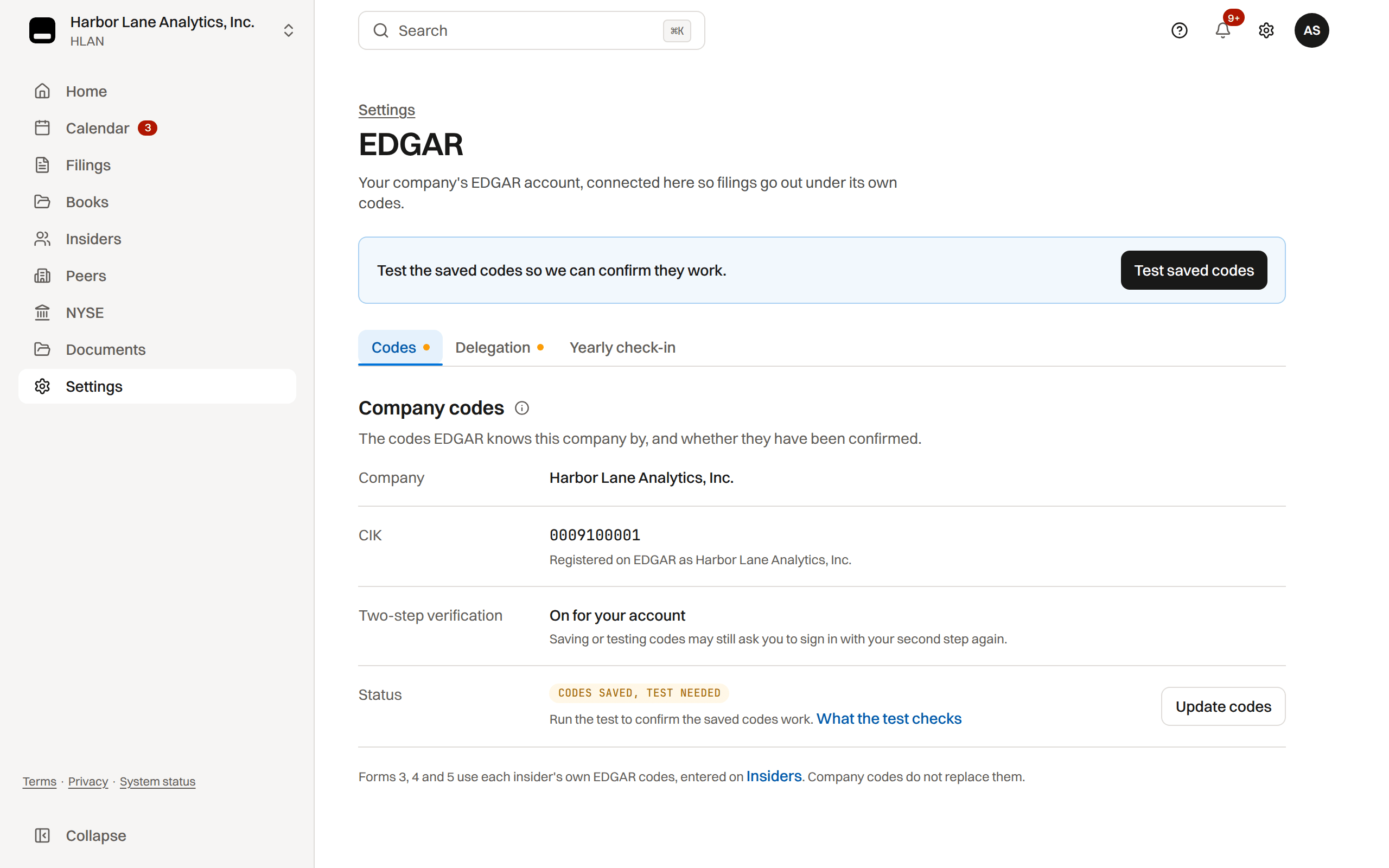
Where: Settings › EDGAR › Codes
Why TakePublic needs the codes
EDGAR accepts a filing only when it carries the company's CIK and CCC, so without the CCC TakePublic cannot transmit anything for the company, TEST or LIVE.
The Central Index Key (CIK) is the public number that identifies the company; the CIK Confirmation Code (CCC) is the private eight-character code that authorizes a filing under that CIK. Until the CCC is saved, the submit action stays disabled and the code test cannot run.
The CCC belongs to the company. EDGAR generated it when the company's Form ID was granted, and the people with permission to file for the company, its EDGAR account administrators, see it and can change it at any time on the dashboard of the SEC's EDGAR Filer Management website. TakePublic never has it until a company admin enters it here.
TakePublic uses the CCC for one thing: it sends the CIK and CCC with each submission it transmits for the company, the TEST submission that checks the codes included. It is stored encrypted and is never shown again once saved: a replacement can be entered, the saved value cannot be read back.
Every plan can test the codes, Monitor included. A passed test shows the saved CCC is the one EDGAR has for the company's CIK. EDGAR tests a code for TakePublic only once the company's delegation to TakePublic is Active; the delegation marks the company Verified on TakePublic (see What Verified on TakePublic means), and TakePublic then reads the CCC itself. Monitor has no delegation step, so there the test waits for a filing plan.
Changing the CCC on the SEC dashboard, which the SEC recommends after any suspected exposure and periodically, invalidates the saved code; enter the new one with Update codes and test it again.
CIK
Your CIK is set during onboarding from SEC records. Company admins review it in Settings › EDGAR on the Codes tab and change it in Settings › Company. The Codes tab shows the name EDGAR registers for the CIK so a wrong number is caught before a code is saved.
CCC format
A CCC is 8 characters from letters, numbers, and @ # $ *, including at least one number and one of those symbols. Letters are optional and case-sensitive. Only company admins can manage EDGAR codes.
Where to enter the CCC
Saving or testing codes requires two-step verification on your own account. Platform admin can also manage the codes when assisting your company.
- Open Settings › EDGAR, the Codes tab, and choose Add codes (Update codes once a code is saved) to enter the CCC.
- Choose Save codes: we check the codes with EDGAR at once. After a failed check, the Codes tab shows what EDGAR answered, and Test saved codes runs it again.
Insider EDGAR codes are separate
Forms 3, 4, and 5 file under the insider's own EDGAR codes, never the company's and never TakePublic's. The company codes in Settings cover company filings like 10-K, 10-Q, and 8-K only.
One set of personal codes serves every company: a director at two companies files both companies' forms under the same CIK and CCC.
Each insider record offers two equal ways to get the person's CCC on file. With Enter codes the insider gave you, a company admin types the code and confirms, on the record, that the person gave it and authorized filing with it, the usual case for a corporate secretary or filing agent holding codes under a power of attorney. Ask the insider to enter their own codes emails them a link to their own view.
Once the person's delegation to TakePublic is Active, Read codes from EDGAR reads the code instead. Every path stores the code encrypted and tests it with EDGAR; the record reads Verified to the company either way, and a code the person typed is never shown to company users. A live send of the person's form waits until the record reads Verified.
Under EDGAR Next the CCC remains a credential the filer may give to whoever files for them (the SEC's Filer Manual: a filer may provide the CCC to its filing agent and should change it after that agent has used it). Only the person's own EDGAR account administrators can generate or change it; TakePublic, as a delegated entity once the person's delegation is Active, can view it on the EDGAR Filer Management dashboard but never reset it.
A lost passphrase or CCC
EDGAR no longer uses a passphrase: the SEC discontinued the passphrase, the EDGAR password and the PMAC with EDGAR Next, which every filer has had to use since September 15, 2025. Today a person signs in to EDGAR with their own Login.gov account, and the CIK and CCC are the only codes a filing carries.
A lost CCC is replaced, not recovered. One of the filer's EDGAR account administrators signs in to the EDGAR Filer Management website with Login.gov and opens My Accounts, the filer, then Manage CCC, where Generate CCC makes a new code (or they type a custom one). Anyone with permission to file for that CIK can see the current CCC on the same dashboard.
A filer with no one who can still sign in as an account administrator applies for access again on Form ID (see Get EDGAR access codes on Form ID).
After a new CCC, update it in TakePublic: a company admin enters the company's in Settings › EDGAR and tests it; for an insider whose delegation to TakePublic is Active, Read codes from EDGAR on their record picks up the new one, and otherwise the code is entered again the way it was first.
Was this helpful?
Thanks for the feedback.Send an EDGAR test submission with the saved company codes before your first real filing.
Still need help?
Sign in and open the Help widget in the lower right corner to message the team. Replies land in the app and by email.
TakePublic is a technology platform, not a law firm, broker-dealer, or auditor. Forms 3, 4 and 5 prepared in TakePublic file only after the reviewer the company designates, such as its securities counsel, signs off; any other filing prepared in TakePublic files only after a licensed securities attorney signs off.